ESP32 with MP3-TF-16P (DFPlayer Mini): Wiring, Playback Control, and Troubleshooting
The MP3-TF-16P (commonly known as DFPlayer Mini) is a compact serial audio module that can play MP3 files directly from a TF card. It is a good fit for voice prompts, alarms, and offline audio in ESP32-based products.
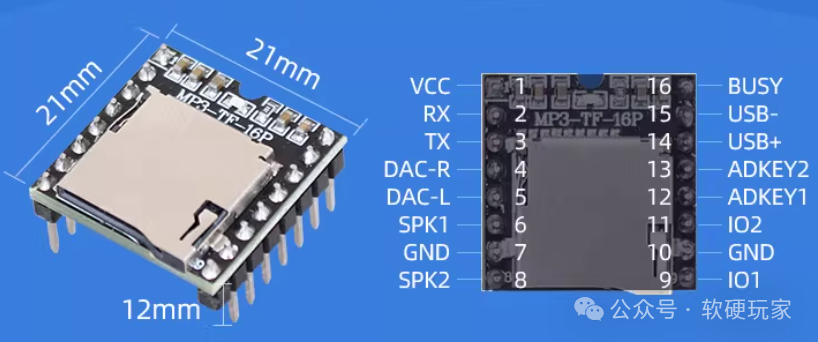
This article solves the most common integration issues: unstable wiring, UART communication failures, incorrect file naming, and unreliable playback detection.
Module Capabilities and Limits
Conclusion: the module is easy to use, but reliable operation depends on power quality and TF card preparation.
Typical capabilities:
- Supports MP3, WAV, and WMA playback.
- Uses UART control at 9600 bps by default.
- Supports FAT16 and FAT32 TF cards.
- Usually supports TF cards up to 32 GB in typical projects.
- Provides speaker output pins and line-level DAC outputs.
Representative electrical/audio parameters from common vendor documentation:
| Parameter | Typical value |
|---|---|
| Supply voltage | 3.3 V to 5 V |
| Operating current | Up to about 200 mA (depends on load/volume) |
| UART baud rate | 9600 bps |
| Sampling rate support | 8 kHz to 48 kHz |
| SNR | Around 85 dB |
| Dynamic range | Around 90 dB |
Assumption: parameter ranges can vary slightly by board clone/manufacturer. Validate with your specific module batch for production designs.
Pin Mapping for ESP32
Conclusion: use cross-connected UART, common ground, and careful voltage strategy.
Recommended mapping example (ESP32-C3):
| MP3-TF-16P pin | ESP32 pin | Notes |
|---|---|---|
| VCC | 5V (recommended) | 3.3V can work but may reduce output power |
| GND | GND | Must share common ground |
| RX | GPIO21 (ESP32 TX) | UART TX from ESP32 to module RX |
| TX | GPIO20 (ESP32 RX) | UART RX on ESP32 |
| BUSY | GPIO10 | LOW = playing, HIGH = idle |
| SPK1/SPK2 | Speaker | Direct speaker output |
Hardware notes:
- Keep GND common between ESP32 and module.
- If the module runs at 5V, verify logic-level compatibility of the module TX pin to ESP32 RX. If uncertain, use a divider or level shifter.
- Add a bulk capacitor (for example, 100 uF) near module VCC/GND to reduce pop/noise and brownout risk.
Software Setup (Arduino + PlatformIO)
Conclusion: with a stable UART and library init check, bring-up is straightforward.
Example PlatformIO dependency:
[env:esp32c3]
platform = espressif32
board = esp32-c3-devkitm-1
framework = arduino
monitor_speed = 115200
lib_deps =
  DFRobot/DFRobotDFPlayerMini @ ^1.0.6
Minimal Working Example
Conclusion: start from a minimal sketch before adding advanced playback logic.
#include <Arduino.h>
#include <HardwareSerial.h>
#include <DFRobotDFPlayerMini.h>

static const int MP3_TX = 21;   // ESP32 TX -> module RX
static const int MP3_RX = 20;   // ESP32 RX <- module TX
static const int MP3_BUSY = 10; // LOW when playing

HardwareSerial mp3Serial(1);
DFRobotDFPlayerMini player;

void setup() {
  Serial.begin(115200);
  pinMode(MP3_BUSY, INPUT);

  mp3Serial.begin(9600, SERIAL_8N1, MP3_RX, MP3_TX);
  delay(500);

  if (!player.begin(mp3Serial)) {
    Serial.println("DFPlayer init failed");
    return;
  }

  player.volume(25); // range: 0..30
  player.play(1);    // play 0001.mp3
  Serial.println("DFPlayer ready");
}

void loop() {
  const bool isPlaying = (digitalRead(MP3_BUSY) == LOW);
  Serial.println(isPlaying ? "Playing" : "Idle");
  delay(1000);
}
Common Playback APIs
Conclusion: keep control functions simple and deterministic.
player.play(1);         // play track index 1
player.pause();         // pause
player.start();         // resume
player.stop();          // stop
player.next();          // next track
player.previous();      // previous track
player.volume(25);      // set volume 0..30
player.randomAll();     // random playback (library version dependent)
player.loop(1);         // loop a track index
Assumption: some APIs differ slightly across library versions. If your installed version does not provide a specific method, use the nearest documented equivalent in that version.
TF Card File Rules
Conclusion: most playback failures come from TF card preparation, not code.
Recommended rules:
- Format card as FAT16 or FAT32.
- Use file names like 0001.mp3, 0002.mp3, and so on.
- Keep files in the expected path/layout required by your command mode.
- Power-cycle module after large file updates so indexing is rebuilt.
Troubleshooting Checklist
Conclusion: diagnose in this order to save debugging time.
- No playback at all:
- Verify TF card format and file names.
- Verify UART cross wiring (ESP32 TX to module RX, and ESP32 RX to module TX).
-
Verify supply stability under speaker load.
-
No sound but playback status changes:
- Check SPK1/SPK2 wiring and speaker impedance.
- Increase volume to a known value (for example 25).
-
Test with a known-good MP3 file.
-
BUSY pin behavior is wrong:
- Verify actual BUSY pin on your board variant.
- Confirm GPIO mapping in code matches hardware.
-
Measure pin level while playback starts/stops.
-
Serial init fails:
- Keep baud rate at 9600 for first test.
- Check power and common ground first.
- Try a shorter UART cable and reduce EMI sources.
Practical Design Notes
Conclusion: electrical design quality strongly affects audio reliability.
- Use 5V input if you need louder speaker output.
- Add local decoupling close to the module.
- Keep speaker wiring away from sensitive RF/ADC traces.
- Use a dedicated power path if your system has Wi-Fi burst current spikes.
References
- DFRobotDFPlayerMini library: https://github.com/DFRobot/DFRobotDFPlayerMini
- Arduino Serial reference: https://docs.arduino.cc/language-reference/en/functions/communication/serial/
- Vendor documents for MP3-TF-16P / DFPlayer Mini module variants